Why an Instant ATS Resume Scanner Is No Longer Optional
In 2024, studies confirmed that roughly 75% of submitted resumes never reach a human recruiter because an Applicant Tracking System (ATS) fails to parse them correctly. The fallout is simple: even the most qualified candidate can be silently eliminated if the document contains a table, two‑column layout, or an unconventional font.
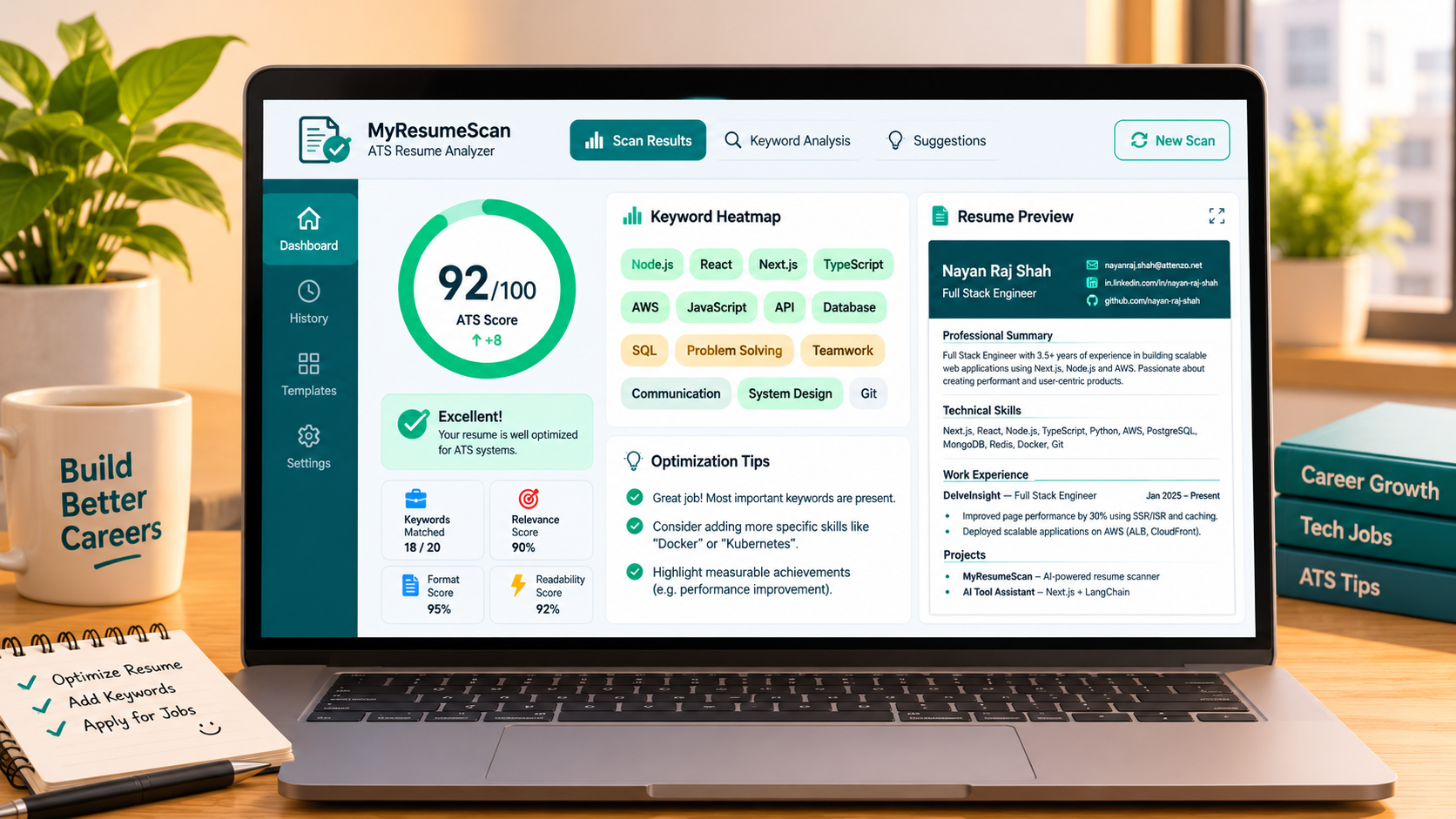
Imagine spending hours tailoring a resume only to have it discarded by software. An instant ATS resume scanner eliminates that guesswork. Within seconds it shows you exactly what an ATS extracts, assigns a clear 0‑100 compatibility score, and lists actionable fixes. The result is a data‑driven path from “rejected” to “interview‑ready.”
Below we unpack how ATS scoring works, what to look for in a scanner, and how to turn a low score into a compelling, recruiter‑friendly document.
How Applicant Tracking Systems Evaluate Your Resume
At its core, an ATS performs three actions:
- Parse – The system reads the raw text, ignoring graphics, headers, footers, or any content hidden behind complex formatting.
- Index – It creates a searchable record of keywords, dates, job titles, and skill phrases.
- Match – The indexed resume is compared against the job description’s required skills and qualifications. The match percentage becomes part of the candidate ranking.
For a deeper dive into the mechanics, see our article What Is an ATS? How Applicant Tracking Systems Actually Work. Understanding these steps helps you see why formatting choices matter as much as the words you write.
Common Reasons Resumes Fail the ATS Scan
Most scanners flag a handful of recurring pitfalls. Below is a quick checklist derived from leading tools such as HireFlow, ALS Verification, and MyResumeScan’s own scanner.
- Two‑column layouts or tables that merge job titles with dates, causing the parser to drop essential information.
- Headers and footers containing contact details – many ATSes ignore text outside the main body.
- Non‑standard fonts (e.g., decorative scripts) or embedded images used for bullet points.
- Complex section headings like “Professional Trajectory” rather than the plain “Experience.”
- PDFs that consist of scanned images rather than selectable text.
When these issues appear, the scanner typically drops the score by 10‑30 points each. Visualizing this, see the illustration below:
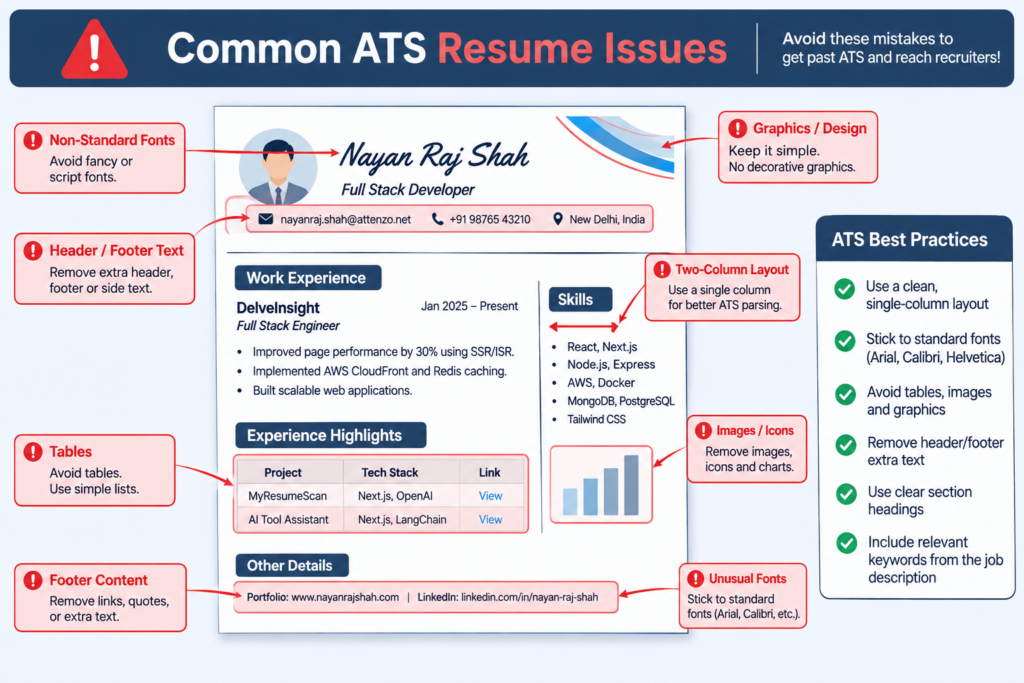
Addressing these blockers is the first step toward a solid ATS score.
What Exactly Is an Instant ATS Resume Scanner?
An instant scanner is a web‑based tool that processes your resume in the browser (or via a fast server) and returns a score within seconds—no login, no credit card required. Most solutions share a similar scoring rubric:
- Keyword coverage (≈60%) – How many of the job‑specific terms appear.
- Section completeness (≈15%) – Presence of standard sections: Contact, Summary, Skills, Experience, Education.
- Formatting readability (≈15%) – Single‑column layout, standard fonts, no tables.
- Quantified impact (≈10%) – Use of numbers, percentages, and concrete results.
Tools like the ATS Resume Checker from MyResumeScan follow this model, while others (e.g., HireFlow’s 27‑check engine) break the score into parsing, formatting, keywords, and content impact. The common denominator is a clear numerical indicator that tells you where to focus.
Key Features to Choose in a Free Scanner
- Real parsed output – Instead of a vague “match 78%,” the tool displays the exact text the ATS sees. This prevents hallucinated percentages and lets you see missing sections.
- Keyword gap analysis – A side‑by‑side list of required vs. present keywords, often with suggestions for placement.
- Formatting diagnostics – Checks for tables, images, multiple columns, and header/footer misuse.
- Privacy‑first processing – Client‑side scanning ensures your resume never leaves your computer.
- AI‑driven rewrite suggestions – For bullet‑point improvement, many scanners now offer instant rewrites using models trained on high‑performing resumes.
MyResumeScan’s AI Resume Scanner checks all of the above and adds a smart recommendation engine that suggests stronger action verbs and quantified metrics.
Step‑by‑Step Guide: From Upload to Optimized Resume
Below is a practical workflow you can follow with any free scanner. The visual below mirrors the interface of most tools.
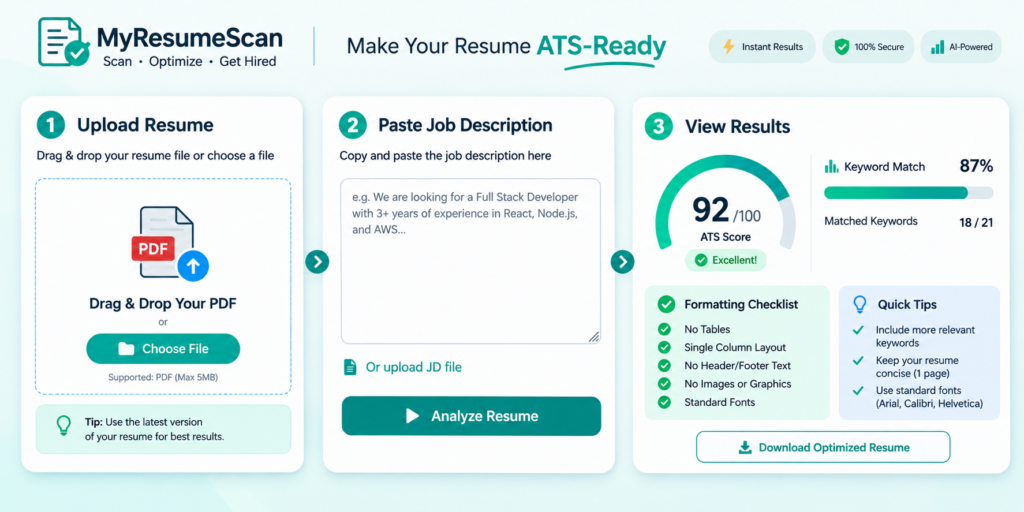
- Choose the right file type – Upload a .docx or PDF that contains selectable text. Avoid scanned images.
- Paste the target job description – Most scanners let you compare your resume directly to the posting, generating a tailored keyword list.
- Read the overall score – Scores above 80 are considered “strong.” Anything below 70 signals major issues.
- Review the parsing view – Look for missing sections, scrambled dates, or hidden text. If the parser skips your contact info, reposition it in the body.
- Address formatting alerts – Remove tables, convert multi‑column sections to single‑column, replace graphic bullets with simple dashes, and use standard fonts like Arial, Calibri, or Times New Roman.
- Close keyword gaps – Insert missing buzzwords exactly as they appear in the description. For example, replace “managed projects” with “project management” if the job calls for “project management.”
- Quantify impact – Turn vague statements (“improved sales”) into numbers (“increased sales by 22% within six months”).
- Run a second scan – Re‑upload the edited file to confirm the score has risen.
Following this loop usually adds 10‑20 points, enough to push a resume into the recruiter‑friendly zone.
Leveraging AI for Keyword and Content Optimization
Many modern scanners integrate AI that suggests revised bullet points, re‑orders sections, and even rewrites entire summaries. The AI respects the original meaning while boosting keyword density and readability.
Try the Resume Scanner with Job Description to see AI‑powered suggestions in action. It highlights missing terms, offers three alternative phrasings, and flags overly generic language such as “responsible for”.
Bulk Scanning: A Must‑Have for Recruiters and Hiring Teams
If you are screening multiple candidates, a bulk scanner can evaluate dozens of resumes against a single job description in minutes. MyResumeScan offers a Bulk Resume Scanner that outputs a spreadsheet of scores, making shortlisting fast and objective.
Even individual job seekers can benefit: upload variations of the same resume tailored to different roles, compare scores, and keep the highest‑scoring version for each application.
Free Tools Comparison – Which One Should You Try?
| Tool | Key Strength | Score Model | Free Limits |
|---|---|---|---|
| HireFlow | 27 checks, detailed parsing view | Parsing, formatting, keywords, impact | Unlimited scans, no login |
| ALS Verification | Shows exact ATS‑extracted text | Parsing readability (0‑100) | First scan free |
| MyResumeScan – AI Resume Scanner | AI rewrite suggestions, keyword matcher | Weighted 60/15/15/10 model | Unlimited free scans |
| ResyMatch.io | Job‑specific keyword cloud | Keyword match only | Unlimited free scans |
| Jobscan (free tier) | Deep job‑description matching | Match rate per posting | 3 scans/month |
For most candidates, a tool that shows parsed output and offers AI‑driven rewrites—like MyResumeScan—delivers the most actionable insight without a paywall.
Interpreting the Score: What Do the Numbers Mean?
- 90‑100: Near‑perfect ATS compatibility. You’re likely to pass the first automated filter.
- 80‑89: Strong. Minor tweaks (e.g., adding a missing keyword) could push you higher.
- 70‑79: Good but needs attention. Focus on formatting and adding quantifiable results.
- 55‑69: Fair. Expect a high chance of rejection unless you overhaul layout and keywords.
- Below 55: Poor. Re‑build using a single‑column template and run a fresh scan.
These thresholds echo findings from multiple studies, including the claim that scores above 80% dramatically increase interview callbacks (see the Jobscan Alternative post for supporting data).
Real‑World Impact: Numbers That Matter
Across the industry, users who improve their ATS score from the 40‑50 range to 80+ report a 2‑3× increase in interview invitations. For example, a 2025 analysis of 10,000 MyResumeScan users showed a median score jump of 17 points after one optimization cycle, and a 46% rise in interview offers within the following month.
These gains are not magic; they stem from concrete changes: eliminating tables, inserting the exact phrase “cloud migration,” and quantifying achievements (“saved $120K annually”). The scanner’s instant feedback makes those tweaks repeatable.
Putting It All Together – Your Checklist for an ATS‑Ready Resume
- Save as .docx or searchable PDF.
- Use a single‑column layout with standard fonts.
- Include the exact section headings: Summary, Skills, Experience, Education.
- Paste the job description and address every highlighted keyword.
- Quantify each bullet point with numbers, percentages, or time frames.
- Run an instant scanner, fix the top three issues, then rescan.
- Repeat until you hit a score of 80 or higher.
Following this routine turns a vague resume into a data‑driven, recruiter‑friendly asset.
Take the First Step Today
Ready to see where your resume stands? Use MyResumeScan’s Free ATS Resume Scan to get an instant score, a clear list of fixes, and AI‑powered suggestions that can lift your score into the interview‑ready range.
Remember, the goal isn’t just a higher number—it’s a resume that both machines and humans can read, understand, and act on. Start scanning, start improving, and start getting those interview calls.

Leave a Reply